
Inspiration through economics
Since 2019, I have been regularly purchasing crypto, specifically Ethereum. When making purchases, swapping currencies in the Ethereum ecosystem, and transferring coins the concept of “Gas” comes into play. Getting the most economically sound transfer requires me to know on demand gas prices and that can be tricky. In an extreme lacking detailed summary, consider it a fee for all types of transactions. You can read more about Ethereum and gas here. The project was very simple, I needed to access an API that gives me estimated Gas prices at the time, prune details of the response, and push it to consumers.
What the code looks like
var dotenv = require('dotenv').config()
var WebSocketServer = require("ws").Server
var http = require("http")
var express = require("express")
var app = express()
var port = process.env.PORT || 5000;
var axios = require("axios")
var server = http.createServer(app);
server.listen(port);

console.log("http server listening on %d", port)

var wss = new WebSocketServer({server: server})
console.log("Websocket server created")

var sockets = [];

setInterval(async () => {
    let { data } = await axios.get(process.env.STATS_API_URL)
    sockets.forEach((ws) => {
        ws.send(JSON.stringify(data), () => {})
    })
}, 50000);

wss.on("connection", async (ws) => {
    sockets.push(ws);
    ws.on("close", () => {
        console.log("Websocket connection close")
    })
});
Websocket creation
Leveraging express to serve a websocket is fairly simple. Here are the major lines to get that done:
var WebSocketServer = require("ws").Server
var http = require("http")
var express = require("express")
var app = express()
var port = process.env.PORT || 5000;
var server = http.createServer(app);
server.listen(port);
This will create a new websocket and express object, fetch the port number from an environment variable (or default to 5000), then set the server to listen on that port.
Websocket events
The bread and butter of websockets is how we utilize events. These events are very similar to event listeners common in other languages and front end frameworks. For our purpose, we are focused on just one event for now, “on”. When someone connects, we want to add them to our collection of sockets. This way when querying the API for current Ethereum gas prices, we can just pass along the data to all sockets in that collection. We are polling the API every 50 seconds in this example:
var wss = new WebSocketServer({server: server})
console.log("Websocket server created")

var sockets = [];

setInterval(async () => {
 let { data } = await axios.get(process.env.STATS_API_URL)
 sockets.forEach((ws) => {
     ws.send(JSON.stringify(data), () => {})
 })
}, 50000);

wss.on("connection", async (ws) => {
    sockets.push(ws);
    ws.on("close", () => {
        console.log("Websocket connection close")
    })
});
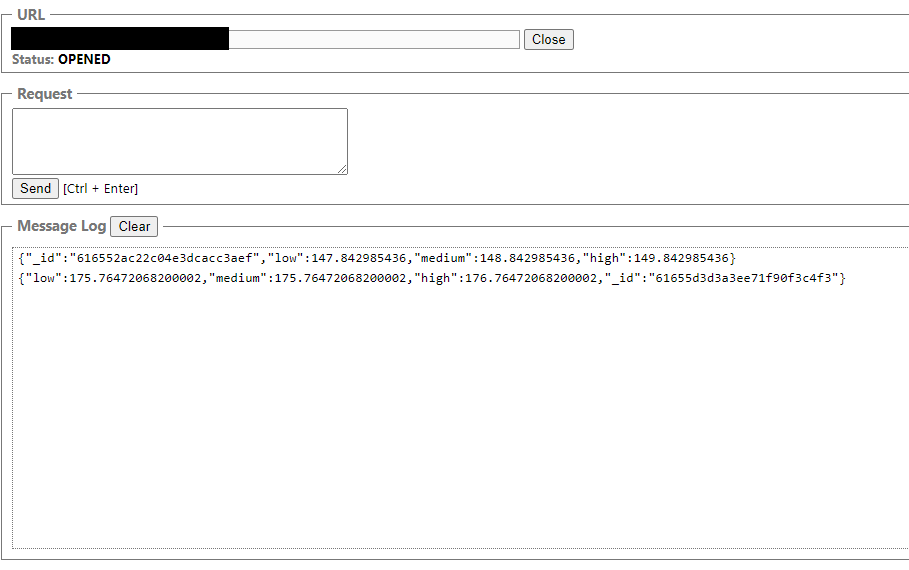
Once this is up and running locally, you can use a Chrome extension such as WebSocket Test Client to see data flowing from your service. Assuming you are running from localhost, the websocket url should be ws://localhost:5000. The output from this example will look something like:
Drawbacks
Naturally there are drawbacks when it comes to this setup. Let’s discuss them.
Pushing to close websockets
The collection used can push data to potentially closed websockets. One could tackle this by using a key-value pair collection. Generating a UUID for the websocket and use it as a key during the “on” event. When the websocket closes, remove the websocket from the collection using the UUID declared earlier.
SCALING UP PUSHES API CALL LIMITS
The above service takes a single API call and pushes it to websockets. However for every instance of the application, this operation occurs. In our example, we query once every 50 seconds. That means for one instance of the application we call the API twice.
- One Instance: 2 API calls.
If we scale this to two instances,
- Two Instances: 4 API calls.
I purposely went into this project hoping to be cheap as possible…cause I want to buy Ethereum. The free tier level for the API allows 5 API calls a minute. Therefore there is a scalability max one should be aware of when implementing this service. Here are the quick maths:
- Max scale = FLOOR((Maximum API calls/minute) / (API calls/instance))
Lets substitute the values here for our service:
- Max scale = FLOOR(5 / 2)
- Max scale = FLOOR(2.5)
- Max scale = 2
So in our case we can only scale our service to about 2 instances.
Conclusion
Getting into Ethereum and Defi were great motivators to learn websockets. The next part is to leverage this data pipeline to be used in different chat systems for notifications (Discord, Slack, WhatsApp, etc). Even with my background in fin-tech, I am glad to see hobbies and interest leading my back programming. If you think of any other way to leverage this data pipeline, please leave me your idea using the contact form and I will credit you.
 Appboy